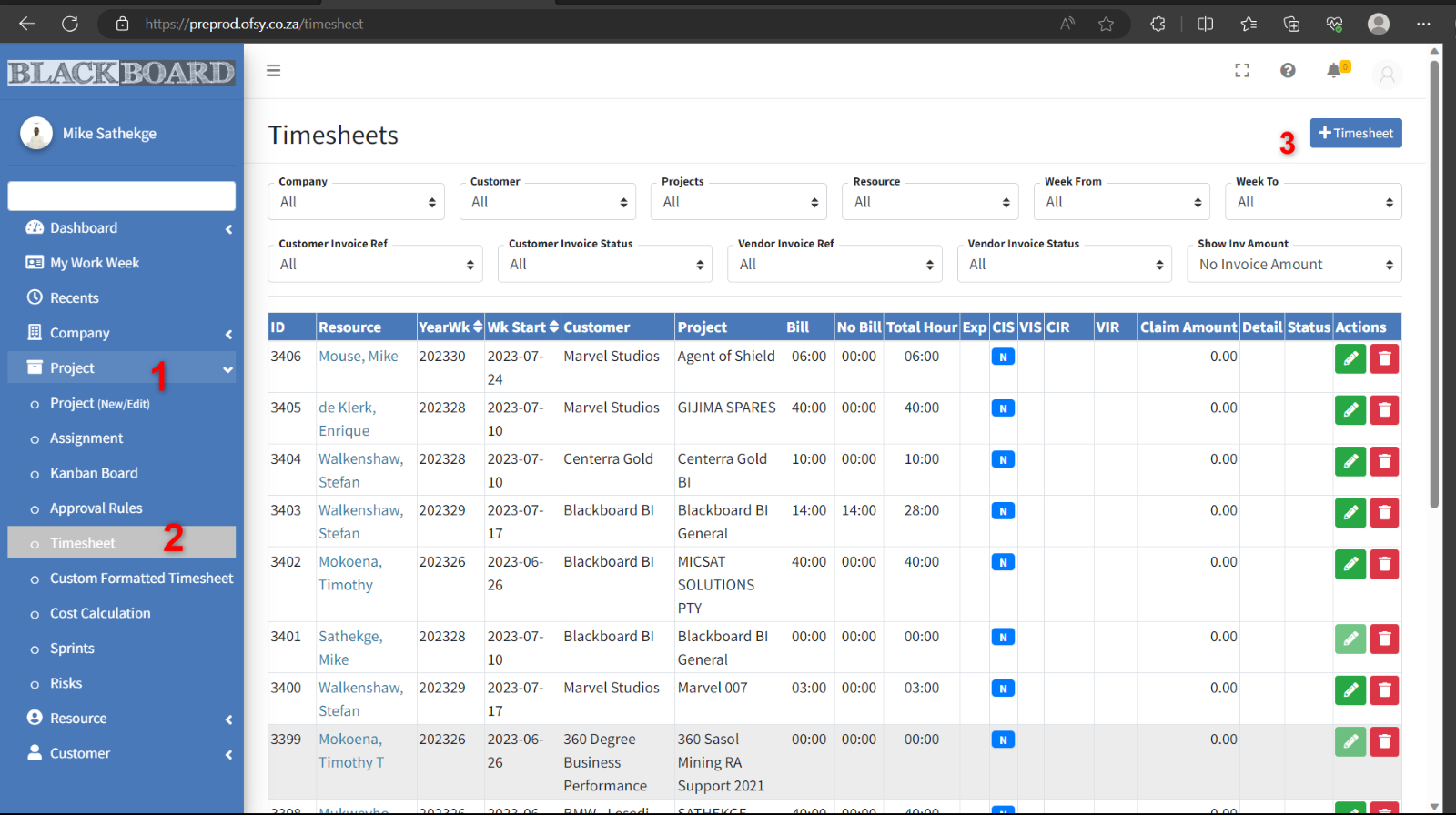
Timesheets are the core of the application. A user captures time and expenses per week against an Assignment.
Only One assignment is allowed per timesheet.
Assignment/Customers/Projects cannot be mixed.
A user can only select the customers and projects that he is assigned to, and timesheets can only be captured if a task has been assigned to the user.
Timesheets cannot run over calendar months. If the new month starts during the week, it needs to be a separate timesheet.
Managers can see timesheets of team members.
Administrator can see all users.
Timesheets cannot run over billing periods.
There are 3 types of billing periods:
- Company billing period
- Customer Billing period
- Vendor Billing Period
Billing Periods needs to be setup on Company / customer and Vendor level for a specific customer or vendor.
The appropriate billing period(s) must be selected when a project is created.
The billing period is enforced on the timesheet. The purpose of a billing period is to ensure that time is not captured for more than one billing period in the same timesheet. This is the same as not allowing time to be captured for days of different months on the same timesheet.
Timesheet
Create a Timesheet
Firstly, In the Left Menu bar, click on Project (1)
Proceed by Selecting Timesheet (2)
Then Click on +Timesheet (3)